HiVis Sheets / Templates / Progress Tracker
Excel template · Instant downloadConstruction Progress Tracker Template (Excel Gantt)
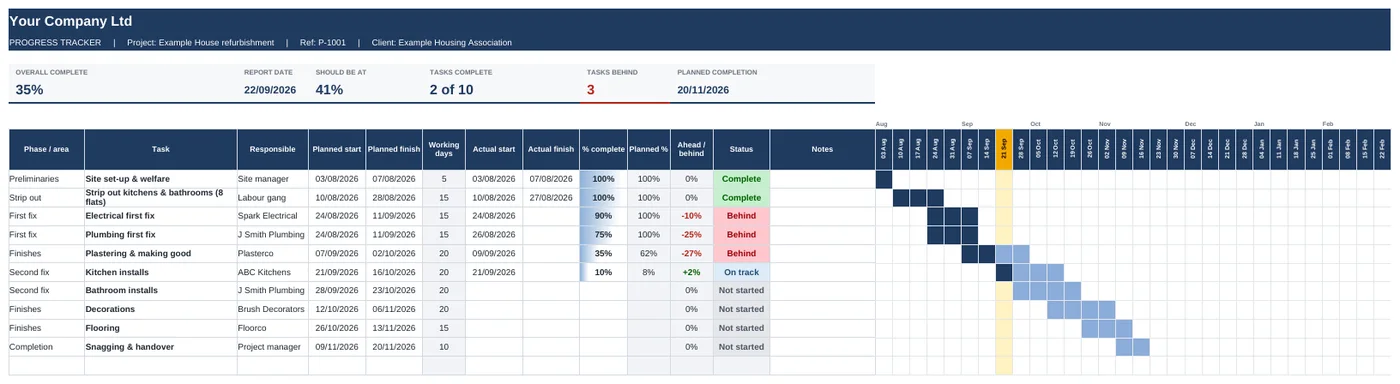
Plan your dates, update one column each week and see straight away what's on track and what's behind.
Swipe to see the full sheet →
What's inside
- Task list with phase, trade, planned and actual dates
- Weekly bar chart (Gantt) that fills in as work gets done
- This week highlighted
- Planned % worked out from the report date
- Ahead or behind for every task, with Behind in red
- Overall % complete, weighted by task length
- Tiles: overall complete, should be at, tasks behind, planned completion
How it works
- Set your project start date on the Start Here tab.
- List your tasks with planned start and finish dates.
- Each week, update the % complete column.
- Print or screenshot it for your client update.
Who it's for: Builders and project managers who need a simple programme they can keep up to date on site.
Every template
Works the way you do
Your logo and coloursCompany name once, logo in, two colours changed.
Phone, tablet or laptopExcel on Windows, Mac, iPhone and Android.
Example rows includedSee how it works, then delete them and start.
Pay onceNo subscription. Use it on every job.
Can I report as at a fixed date?
Yes. Type a date over the report date on Start Here.
How many tasks can it hold?
100 rows, and the bar chart covers 30 weeks.
How do I get it after paying?
You'll get a download link straight away on screen and by email. It's a normal Excel file.
What if it is not what I needed?
Email within 14 days and I will refund you.
Get all 9 templates for £39
Quotes, invoices, job costing, subbie payments, snagging, progress, variations, RFIs and resident liaison.