HiVis Sheets / Templates / Labour Allocation Tracker
Excel template · Free downloadFree Labour Allocation Tracker for Small Builders
Who's on which job, how many hours, and what those hours are costing you. A week on one screen, free.
FreeGet it free
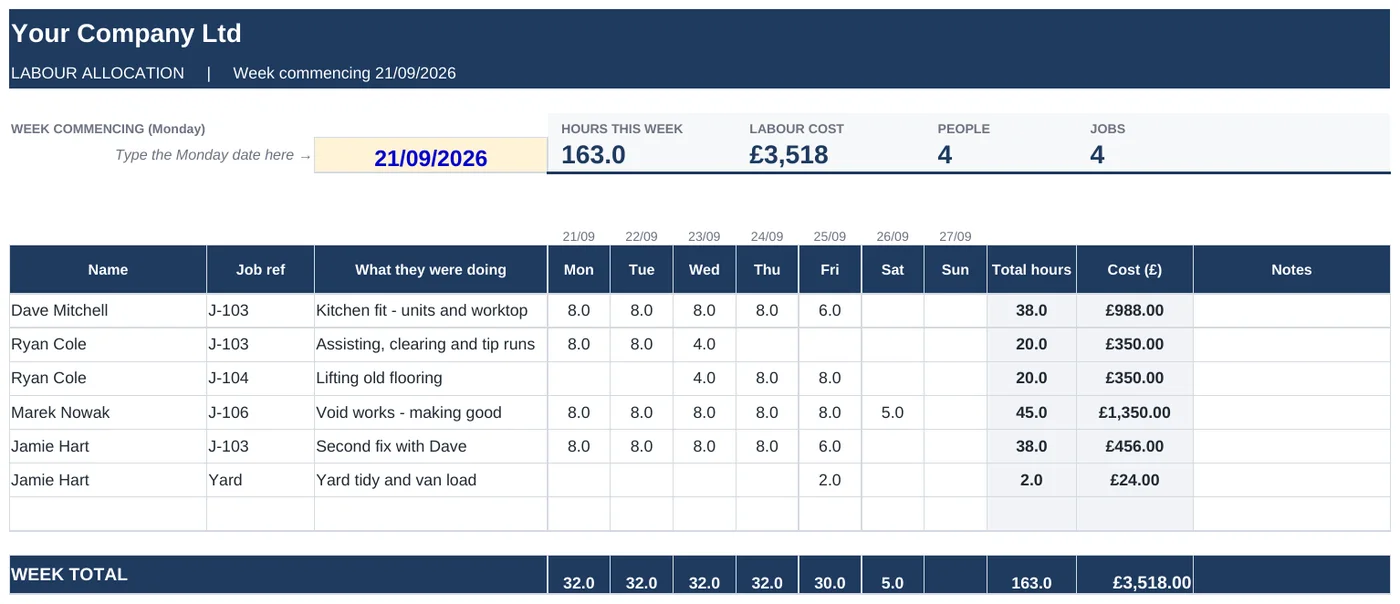
Swipe to see the full sheet →
What's inside
- One row per person per job, hours by day
- Weekly totals per person and per job
- Cost worked out from each person's hourly cost
- Hours by job, so you can see where the week went
- Anyone over 48 hours flagged
- Copy the tab for each new week
How it works
- Add your people and what they cost you per hour.
- Add your live jobs.
- Fill in hours as the week goes.
- Look at the cost per job on Friday. It's usually a surprise.
Who it's for: Small builders and contractors with two or more people on the books who are guessing at labour cost.
Every template
Works the way you do
Your logo and coloursCompany name once, logo in, two colours changed.
Phone, tablet or laptopExcel on Windows, Mac, iPhone and Android.
Example rows includedSee how it works, then delete them and start.
Pay onceNo subscription. Use it on every job.
How do I get it after signing up?
You get the download link on the next page and by email.
Get all 9 templates for £39
Quotes, invoices, job costing, subbie payments, snagging, progress, variations, RFIs and resident liaison.