HiVis Sheets / Templates / RFI Tracker
Excel template · Instant downloadRFI Tracker Template for UK Contractors
Raise requests for information and get the client's answer in the same sheet. No more hunting through six email chains to prove what you asked and when.
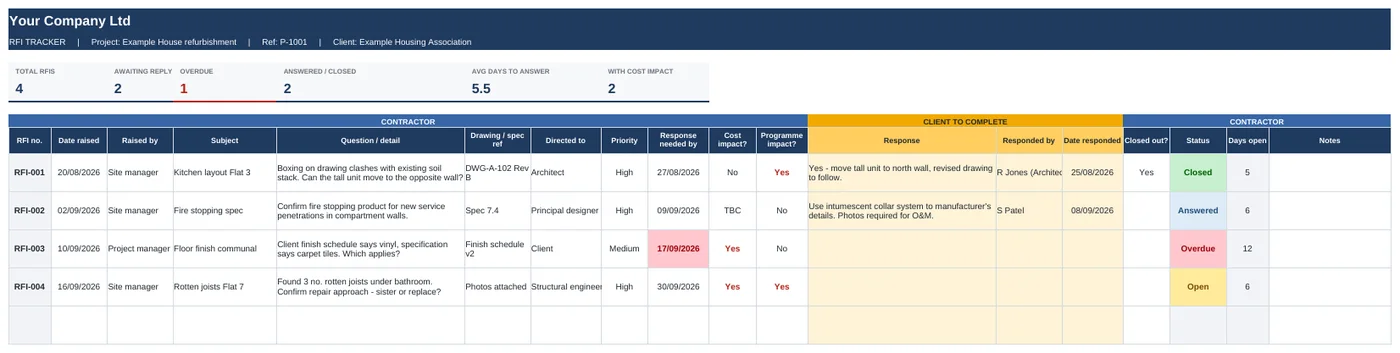
Swipe to see the full sheet →
What's inside
- RFI log with auto numbering (RFI-001, RFI-002...)
- Yellow columns for the client or designer to answer in
- Response-needed-by date - status flips to Overdue when it passes
- Cost impact and programme impact flags
- Status worked out for you: Open, Overdue, Answered, Closed
- Days open and average days to answer
- Directed-to dropdown: client, architect, engineer, M&E and more
How it works
- Add your details on the Start Here tab.
- Log each question with a drawing or spec reference and a response date.
- Share the file with the client through OneDrive or SharePoint.
- They answer in the yellow columns. You close it out when you're happy.
Who it's for: Main contractors and project managers who need a clear record of design questions and answers, especially on jobs where the answers turn into variations.
Works the way you do
Does the client need special software?
No. If they've got Excel or can open a OneDrive link, they can fill in their columns.
Can I see which RFIs could cost money?
Yes. Filter the Cost impact column to Yes - those are your likely variations.
How do I get it after paying?
You'll get a download link straight away on screen and by email. It's a normal Excel file.
What if it's not what I needed?
Email within 14 days and I'll refund you.
Get all 6 templates for £39
Snagging, RFI, variations, progress, resident liaison and quotes. Save £33.