HiVis Sheets / Templates / Snagging Tracker
Excel template · Instant downloadSnagging Tracker Template for UK Contractors
Log every defect with before and after photos, assign it to a trade and chase it through to sign-off. Built for handovers on refurb, new build and social housing jobs.
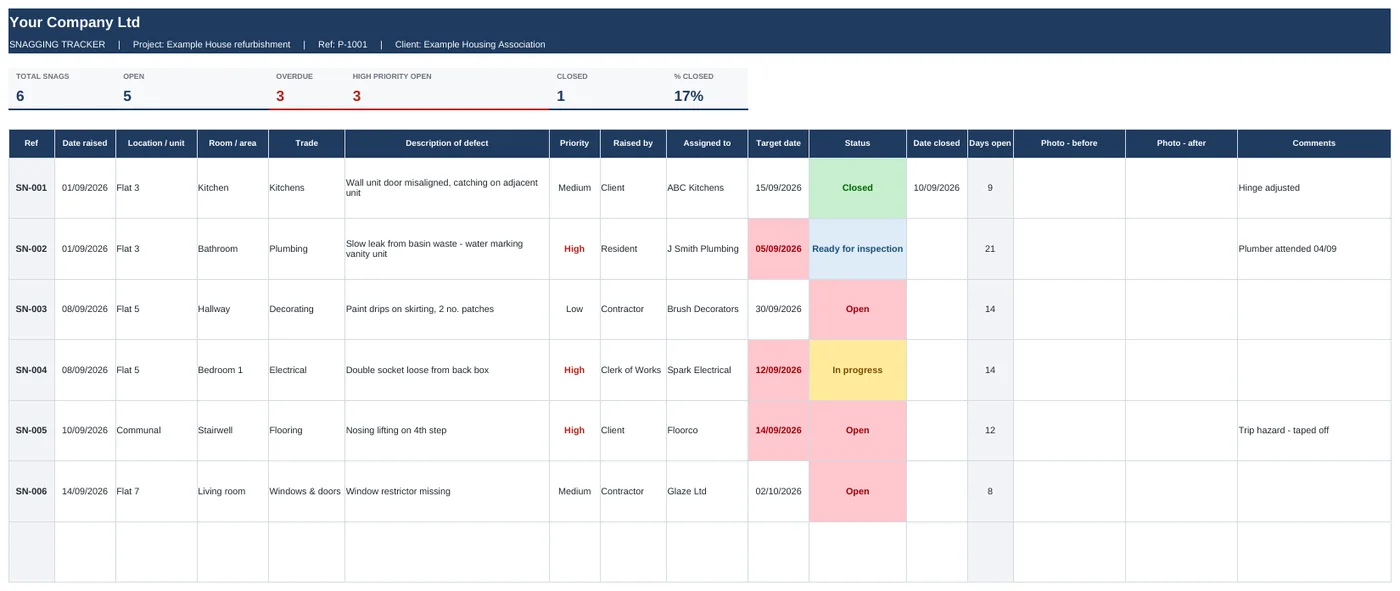
Swipe to see the full sheet →
What's inside
- Snag list with auto reference numbers (SN-001, SN-002...)
- Before and after photo columns - pictures sit inside the cell
- Trade, priority, raised by and status dropdowns you can edit
- Target dates that turn red when a snag goes overdue
- Days open worked out for every snag
- Summary tab: open, overdue and closed snags for each trade
- Tiles at the top: total, open, overdue, high priority, % closed
How it works
- Add your company name and logo on the Start Here tab.
- Walk the job and log each snag - location, room, trade, description and a photo.
- Send the Summary tab to each subbie so they know exactly what's theirs.
- Mark snags Ready for inspection, check them, then Close them off.
Who it's for: Site managers, project managers and clerks of works running handovers, plus subbies who want to show the client their snags are cleared.
Works the way you do
Do the photos work on a phone?
Yes, in Excel 365 on iPhone and Android. Tap the photo cell, then Insert, Pictures, Place in Cell. The photo moves with the row when you sort or filter.
Can I use my own trade list?
Yes. Edit the Lists tab and every dropdown updates, including the summary by trade.
How do I get it after paying?
You'll get a download link straight away on screen and by email. It's a normal Excel file.
What if it's not what I needed?
Email within 14 days and I'll refund you.
Get all 6 templates for £39
Snagging, RFI, variations, progress, resident liaison and quotes. Save £33.