HiVis Sheets / Templates / Subcontractor Payment Tracker
Excel template · Instant downloadSubcontractor Payment Tracker with CIS and Retention
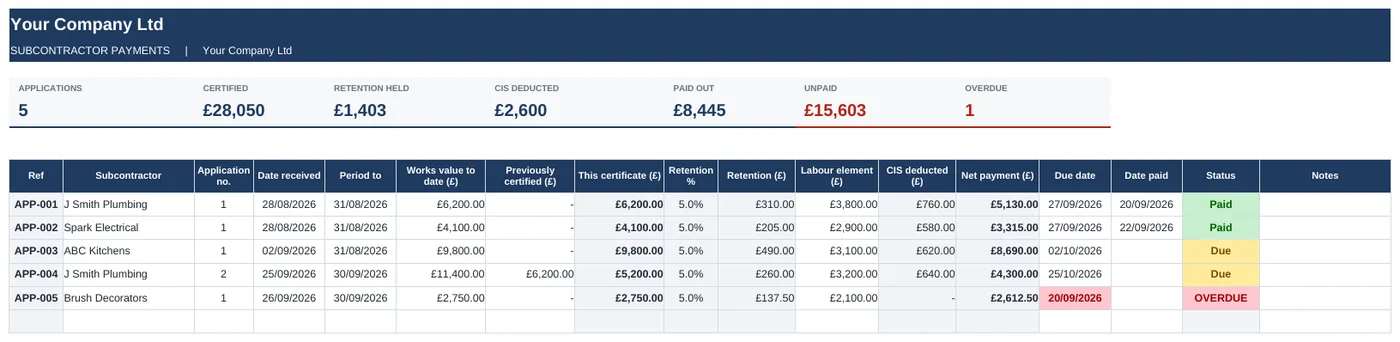
Every subbie, what they've applied for, what you've certified, what you're holding in retention and what CIS you've deducted.
Swipe to see the full sheet →
What's inside
- Subcontractor list with order value, retention % and CIS status
- Applications logged with works to date and previously certified
- This certificate worked out for you
- Retention pulled from each subbie's rate
- CIS deducted on the labour element at 0%, 20% or 30%
- Net payment and due date, with overdue payments in red
- Per-subbie totals: certified, retention held, paid, outstanding
How it works
- Add each subcontractor, their retention % and CIS status.
- Log each application as it comes in.
- Enter the works value to date and the labour element.
- Fill in the date paid. Anything unpaid past its due date turns red.
Who it's for: Small main contractors and builders who use subbies and need a clear record of payments, retention and CIS.
Works the way you do
Does it work out CIS for me?
It applies the rate you've set for that subbie to the labour element you enter. It's a record, not tax advice - always verify subcontractors with HMRC.
Can I see retention across all jobs?
Yes. The Subcontractors tab shows retention held for each subbie and in total.
How do I get it after paying?
You'll get a download link straight away on screen and by email. It's a normal Excel file.
What if it is not what I needed?
Email within 14 days and I will refund you.
Get all 9 templates for £39
Quotes, invoices, job costing, subbie payments, snagging, progress, variations, RFIs and resident liaison.